Beating the Bots: How to Navigate AI Resume Screening and Job Interviews

Most resumes don’t get past AI resume bots in job applications, here’s how to get noticed.

ai interviews and resume

At a Glance:

  • Learn how Applicant Tracking Systems (ATS) filter resumes
  • Optimise your resume with simple formatting, standard headings, and ATS-friendly fonts
  • Improve visibility by using relevant keywords and aligning your experience with job descriptions
  • Choose the right file format and structure to ensure your resume is correctly read by AI systems


ATS Resume & AI Interview Guide

75% of resumes submitted are never read by a human. These days, the rules of hiring have changed. In the past, the goal of job seekers was simple: impress a hiring manager enough to get an interview. While that still holds true today, it is no longer your first hurdle.

From the moment you submit a job application, your resume is likely to be filtered, ranked, and screened by automated systems designed to shortlist candidates at scale. AI is often the first layer of screening, deciding whether your application ever reaches a human recruiter.

The system behind this is known as the Applicant Tracking System (ATS), software used by employers to digitally manage and filter job applications. These tools are increasingly used to handle large volumes of applications and match candidates to roles more efficiently. Beyond resumes, some employers are also introducing AI into the interview process itself, using tools such as AI video assessments to evaluate early-stage candidates.


This article shares practical tips on how to beat ATS resume screening, improve your resume formatting for AI systems, and prepare effectively for AI screening interviews.


AI is Changing Recruitment

As of 2025, more than 90% of employers already use some form of automation to filter or rank job applicants. These ATS systems scan resumes for relevance, matching skills, experience, and keywords against job descriptions.

This does not mean decisions are fully automated, but it does mean the first layer of evaluation is structured. Resumes are immediately assessed based on how clearly they signal fit for the role. Information that is easy to identify and aligned with the job requirements is more likely to be surfaced, while details that are unclear or poorly structured may be overlooked.

At the same time, platforms like LinkedIn and other job portals have introduced AI-powered tools to support recruiters in sourcing and screening candidates more efficiently. This further shapes how candidates are discovered, not just how they are evaluated after applying.

While these changes help employers manage scale and speed up hiring, they also shift what matters for candidates. It is no longer just about having the right experience, but about presenting it in a way that can be easily recognised by both systems and people.


What exactly is ATS?
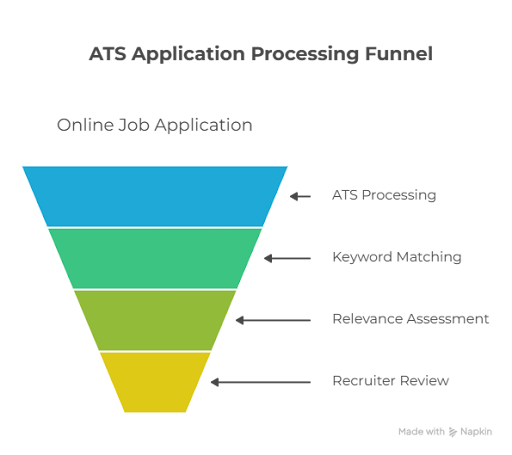
ats application processing funnel resume

When you apply for a job online today, your application often goes directly into an Applicant Tracking System (ATS). Sometimes, this means filling in application fields manually. Other times, you simply upload your resume or cover letter.

Once submitted, the ATS processes your application using text recognition software. Unlike a human recruiter, it does not read your resume line by line. Instead, it scans for relevant information and looks for matches between your resume and the job description. This often includes keywords such as “project management” or “event planning”, as well as skills, experience, and job titles.

Resumes that meet a certain level of relevance are more likely to be passed on to recruiters, while those that do not may be filtered out early. Because these systems are not perfect, they may struggle to pick up nuance or interpret meaning beyond what is clearly stated. In some cases, formatting issues can prevent the entire resume from being read properly.

In simple terms, the goal is not just to impress a recruiter, but to make sure your resume can be clearly understood and recognised by the system first.


5 tips For Creating An ATS Optimised Resume 
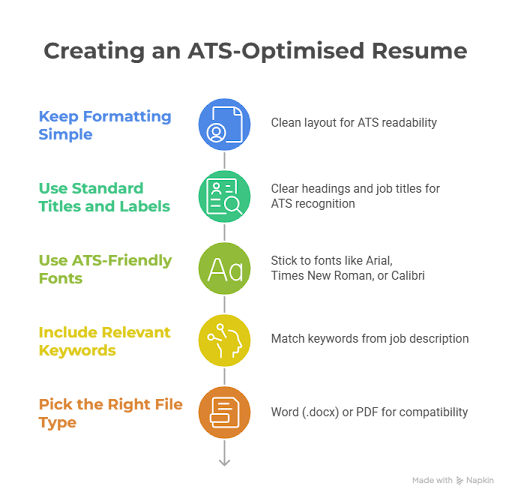
ats optimised resume ai

1. Keep Formatting Simple

Use a clean, simple layout so your resume can be easily read by an ATS. Avoid complex designs, tables, columns, text boxes, or graphics, as these can interfere with how information is processed and may cause sections to be missed by the system.


2. Use Standard Job Titles and Labels 

Clear, standard headings such as Professional Summary, Experience, Education, and Skills help ensure ATS systems can correctly identify and categorise your information. Job titles should also be clearly stated and easy to recognise.

While companies may use a wide variety of job titles, it’s helpful to translate them into more standard equivalents where appropriate, as overly creative or unconventional titles may not always be recognised by ATS systems when interpreting your resume.


3. Use ATS-Friendly Fonts

Stick to standard fonts like Arial, Times New Roman, or Calibri, and keep the font size between 10–12 points. These are scannable for both ATS systems and recruiters, keeping your resume clear and professional. Avoid using logos, icons, or images, as these cannot be processed by ATS systems and may cause important information to be missed.


4. Include Relevant Keywords 

ATS systems match resumes against job descriptions using keywords such as skills, tools, and job titles. Study the job description of the role you are applying for carefully and incorporate relevant role-specific terms naturally into your professional summary, skills section, and work experience.

Also include acronyms like “MBA” alongside full terms such as “Master of Business Administration” to improve clarity and match relevance. But remember to use it naturally and not fall victim to keyword stuffing! 


5. Pick the Right File Type

While many application systems allow different file formats, a Word (.docx) file is often the safest choice for ATS compatibility, although some systems may also accept PDFs. Always take the time to review the job application instructions carefully and follow them closely.


Facing the Bot In AI Interviews

Getting through the application stage and finally reaching the interview stage can feel like progress. Then you realise the first “interview” might not involve a person at all. It is a recorded response on a screen, with no one on the other side.

If you have ever spoken into your webcam, watched a countdown tick down, and wondered “Am I doing this right?”, you’re certainly not alone. 

LinkedIn’s 2025 Global Talent Trends Report states that over 44% of recruiters in Singapore are already using AI-powered tools to assess communication style, technical skill alignment, and even emotional intelligence during video interviews.

For jobseekers, this means preparing for interviews that feel different. AI interview may be more structured and less natural in flow, but they also reward how clear and confident responses.


Tips to Ace AI Interviews

ai interview tips


Practice Clear, Concise Answers

AI interviews reward clarity. Keep your answers focused and avoid long-winded explanations. Think in key points rather than full scripts. For situational questions, structure your responses using the STAR method (Situation, Task, Action, Result) to keep your answers organised and easy to follow.


Maintain Good Posture and Eye Contact

Sit upright and speak directly to the camera lens rather than your screen. This helps you appear more engaged and confident, even in a recorded setting.


Watch your Pacing

AI interviews often give you preparation time before you respond, so avoid rushing into your answer. Take a breath, note a few keywords if needed, and then speak clearly at a natural pace. Try to avoid filler words, as these may affect language fluency scores, but do not be afraid to pause when thinking, as this often comes across as more confident.


Ensure a Professional Environment

Make sure you have a clean background with good lighting and no noise in the background. Remember regardless of whether it is a bot or a human, first impressions count!


Navigating Your Job Search with Support

It is not always straightforward figuring out what employers are looking for in today’s job market, let alone the added layers of AI embedded in the hiring process now. For jobseekers, the advantage comes from understanding how these systems interpret information. A well-structured resume and confident, organised interview responses all help ensure your experience is accurately recognised, rather than lost in the process.

If you are currently in the job search process and looking to strengthen your approach, there are plenty of support options available. Our events, workshops, and seminars are designed to help you stay updated on insights, developments, and tips you can apply directly to your career development.

For more tailored guidance, Lifelong Learning SG’s Skills Ambassadors can help you better understand your strengths and development areas, and recommend relevant courses to support your career growth. There are also a range of career advisory services available to support you with your resume and interview preparation, so you can navigate each stage of the process with more clarity and confidence.


FAQs

AI resume screening uses Applicant Tracking Systems (ATS) to scan and filter job applications before they reach a recruiter. It matches resumes against job descriptions using keywords, skills, job titles, and experience to shortlist candidates at scale.

Resumes may be filtered out if they are poorly structured, use non-standard formatting, or do not include relevant keywords from the job description. Even formatting issues can sometimes prevent parts of a resume from being properly read.

Use clear headings, standard fonts, and simple formatting. Include relevant keywords naturally, highlight measurable achievements, and submit in ATS-friendly formats like Word or PDF. For interviews, practise clear, structured answers using the STAR method and maintain steady pacing and eye contact with the camera.

Yes, many employers in Singapore use AI tools for resume screening and early-stage interviews. Jobseekers can access support through LLSG’s Skills Ambassadors as well as career advisory services for guidance on skill, resumes, interview preparation, and career planning.

Posted on 5/20/2026 9:00:00 AM